
Automatic Translator Plugin For WordPress Frontend (JustAlien)
A WordPress plugin that translates the front pages
How to get it
Activate Plugin
Purchase translation characters on this page.
From the plugin Admin Page connect to JustAlien using your JustAlien email.
Pricing
Pay As You Go price per number of translated characters.
Plugin details
Provides front pages translation on the fly.
No translation data stored in the WordPress Database, keeping WordPress fast. Stored in file system.
Users see translated pages on the fly, no extra overhead on the WordPress Database.
Clean Uninstall: No lingering data in WordPress
Translate: Pages/Posts
We are also adding: Translate WordPress Custom PHP Pages, Translate WooCommerce Pages
SEO for translated pages
The plugin does not create extra WordPress pages for each translated language, therefore search engine will not see those.
However the website will present in the selected language for each visitor.
To achieve SEO you can add to a specific section of your WordPress website, for example a category, a post in each targeted language. Each post can serve as landing page for that language and include links to your other translated pages. There is no need for link duplication for each language. Users select their language once via the dropdown. From there each Translated Page will automatically show in the chosen language.
Operation
Translate pages once. When the Page’s content changes, you need to retranslate the page to translate the new changes. Currently you have to retranslate the whole page, there is planned feature update to translate only the changes but this can be released in an update, given the demand.
Which languages are supported?
Several languages are supported.
| አማርኛ (Amharic) العربية (Arabic) অসমীয়া (Assamese) Azərbaycanca (Azerbaijani) Български (Bulgarian) বাংলা (Bengali) Bosanski (Bosnian) Català (Catalan) Čeština (Czech) Cymraeg (Welsh) Dansk (Danish) Deutsch (German) Ελληνικά (Greek) English (English) English (English) Español (Spanish) Español (Spanish) Eesti (Estonian) Euskara (Basque) فارسی (Persian) Suomi (Finnish) Filipino (Filipino) Français (French) Français (French) Gaeilge (Irish) Galego (Galician) ગુજરાતી (Gujarati) עברית (Hebrew) हिन्दी (Hindi) |
Hrvatski (Croatian) Magyar (Hungarian) Հայերեն (Armenian) Bahasa Indonesia (Indonesian) Íslenska (Icelandic) Italiano (Italian) 日本語 (Japanese) ქართული (Georgian) Қазақша (Kazakh) ខ្មែរ (Khmer) ಕನ್ನಡ (Kannada) 한국어 (Korean) ລາວ (Lao) Lietuvių (Lithuanian) Latviešu (Latvian) Македонски (Macedonian) മലയാളം (Malayalam) Монгол (Mongolian) मराठी (Marathi) Bahasa Melayu (Malay) Malti (Maltese) မြန်မာစာ (Burmese) Norsk Bokmål (Norwegian) नेपाली (Nepali) Nederlands (Dutch) ଓଡ଼ିଆ (Odia) ਪੰਜਾਬੀ (Punjabi) Polski (Polish) پښتو (Pashto) |
Português (Portuguese) Română (Romanian) Русский (Russian) සිංහල (Sinhala) Slovenčina (Slovak) Slovenščina (Slovenian) Soomaali (Somali) Shqip (Albanian) Српски (Serbian) Svenska (Swedish) Kiswahili (Swahili) தமிழ் (Tamil) తెలుగు (Telugu) ไทย (Thai) Türkçe (Turkish) Українська (Ukrainian) اردو (Urdu) O‘zbek (Uzbek) Tiếng Việt (Vietnamese) 简体中文 (Simplified Chinese) 繁體中文 (Traditional Cantonese) 繁體中文 (Taiwanese Mandarin)isiZulu (Zulu) |
Automatic Language Selection Prompt for new site visitors
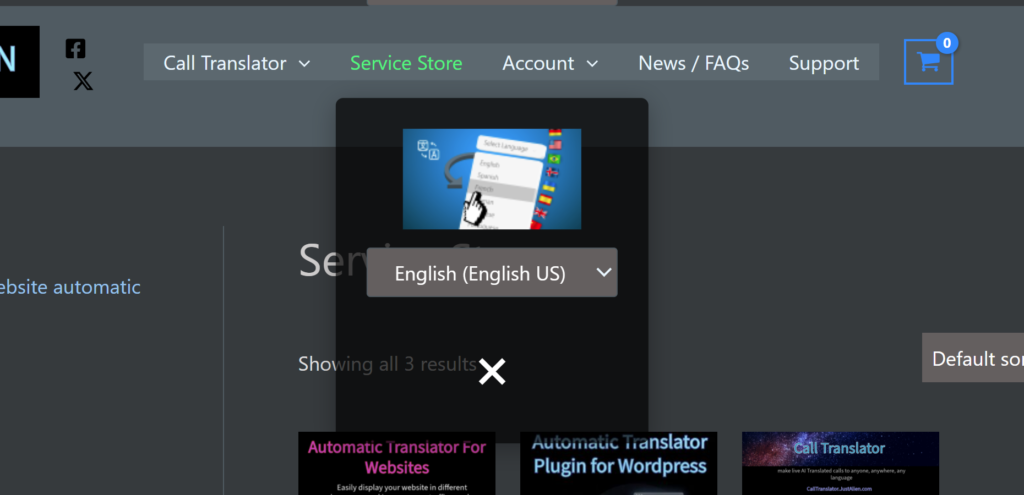
Translator User Interface
*Note: Dark Mode is shown using Dark Reader browser plugin. The current built in theme is Light background.
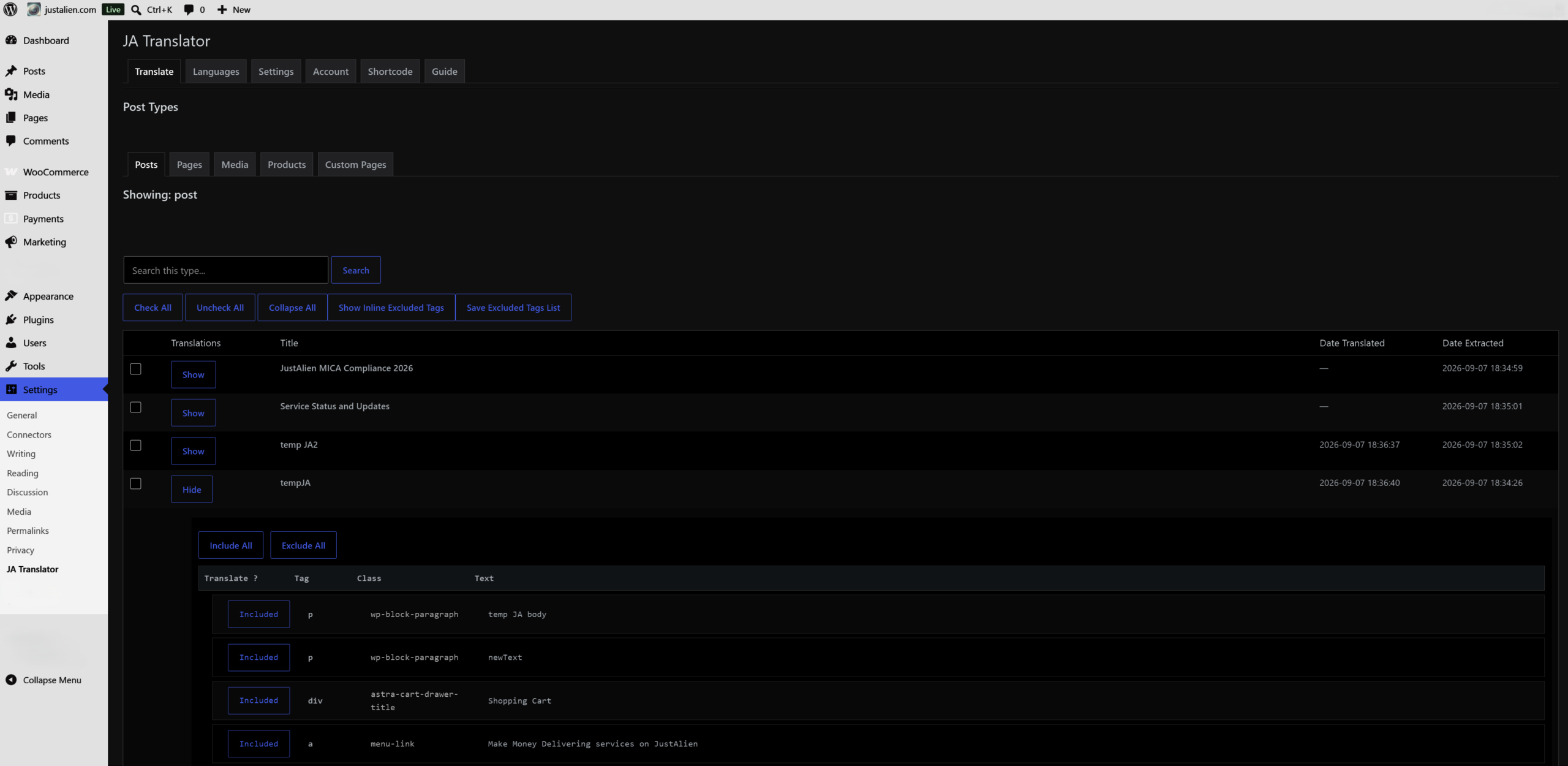
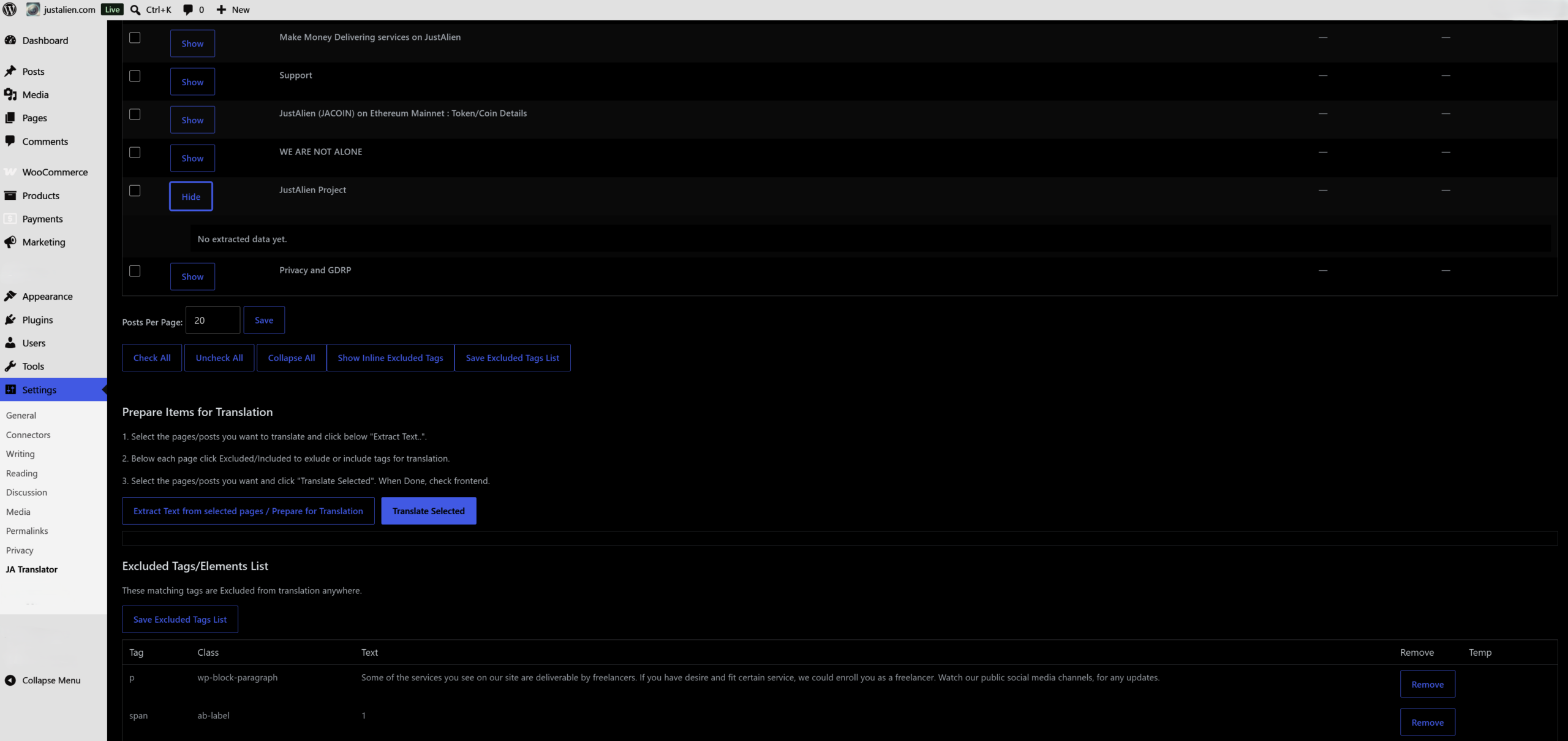
“How To Translate” Guide:
How to Translate your front end pages:
Go to the sub page depending on which post type you want to translate ( posts, products, etc ). If some URLS are not shown, enter them in the Custom Pages tab, one per line, clicking Save (see below Custom Pages).
Translation is two step process:
1. Select the checkboxes of the pages/posts you want to translate and click “Extract Text….”. Once this process completes you can expand each item and you can exclude any text items/phrase which you do not wish to translate. These will be added to the Excluded Tags/Elements List which is a collapsable table shown in there.
2. Now to translate the page, again select which pages you want to translate and click “Translate Selected”. Do not close the browser page, as the system performs translation – this can take minutes.
Custom Pages Tab (WooCommerce etc )
If post type is not listed go to the Custom Pages tab, in the list enter, one per line, any frontend WordPress URL you want to translate and click Save.
You can grab the URL/Address from the address bar on the particular page.
For example WooCommerce pages such as checkout, user account, can be translated by grabbing the URL and pasting it in the “Custom Pages”, then continuing the two step process above.
Excluded Tags/Elements
Any phrase/tag which has been excluded appears on this list and will never be sent for translation. The exclusion list is global in V1. You can collapse the list or remove items.
Limitations for V1/ Improvements for JA Translator V2.
The following features are not available in V1 but we might add them per demand:
– Translate page updates only. Currently we translate the whole page, to all selected language, at each Translate Selected click.
– Automatic translations of updates. Currently for a user to update a page’s translation, they have to click “Translate Selected” manually for each page that needs updating.
– Making the ignore table more flexible for larger sites.
– UI improvements.
Support
See extension’s support thread.
Terms of service
Service disruptions are possible. Retry later.
Planned features
Override custom names / phrases. Currently it is fully Auto. The next update will target to add word overrides so that certain phrases will translate certain way always.